GPC Opt Out: UX Fails or Malicious Compliance?


Starting on January 1, the California Consumer Privacy Act (CCPA) requires that websites provide confirmation that they have honored a user’s Global Privacy Control (GPC) opt out. Unfortunately, many cookie consent banners are doing this in the most confusing way possible and making me wonder if they are doing it intentionally or not.
What is Global Privacy Control?
Global Privacy Control is a web standard that allows users to tell websites that they wish to opt out of having their information tracked or sold. In theory, if you have set Global Privacy Control, you shouldn’t see any cookie consent banners.
Global Privacy Control works behind the scenes by setting two values. One is an HTTP Header, Sec-GPC: 1, that is sent by the browser with every request to a server. The second value makes sure GPC is available to JavaScript by setting navigator.globalPrivacyControl property to true.
Some browsers—Firefox, DuckDuckGo, and Brave among them—implement GPC support by default. For other browsers, you can install extensions like the Electronic Freedom Foundation’s Privacy Badger. If you want to test to see if your browser is sending GPC correctly, you can test it on the Global Privacy Control informational site.

What happened to Do Not Track?
Some of you may be wondering how Global Privacy Controls differ from an earlier solution called Do Not Track. While Do Not Track also used HTTP Headers to opt out of tracking, it wasn’t an official standard, and never gained traction with website owners. In 2019, the working group behind Do Not Track disbanded, and browsers started removing support for it.
The biggest difference between Do Not Track and GPC is that GPC has been codified in law. Eleven states require businesses to honor GPC opt outs. The EU’s General Data Protection Regulation (GDPR) was written before GPC was created, but it likely that GPC still applies under GDPR. According to CookieScript, “While not explicitly mentioned in the GDPR regulation, the principles of ‘Privacy by Design’ and ‘Ease of Withdrawal’ make GPC signal a requirement to honor user opt-out choices.”
UX fails or malicious compliance?
All of this brings me back to California’s new GPC confirmation rule and the odd way that cookie consent solutions have implemented it. Digital compliance vendor Clym describes the new rule thusly:
Starting in 2026, it is no longer sufficient to simply process an opt-out silently. If you receive an opt-out signal (like the Global Privacy Control), you must explicitly display a confirmation to the user.
- Requirement: You may need to display a message like “Opt-Out Request Honored” or show a toggle in the user’s privacy settings indicating they have opted out.
- This allows consumers to know that their automated browser signals are working.
Because I have GPC turned on in my browser, I began to see these confirmations. Unfortunately, it is often not clear what I should do with the information. For example, this is what I saw on a recent website using OneTrust for cookie management:
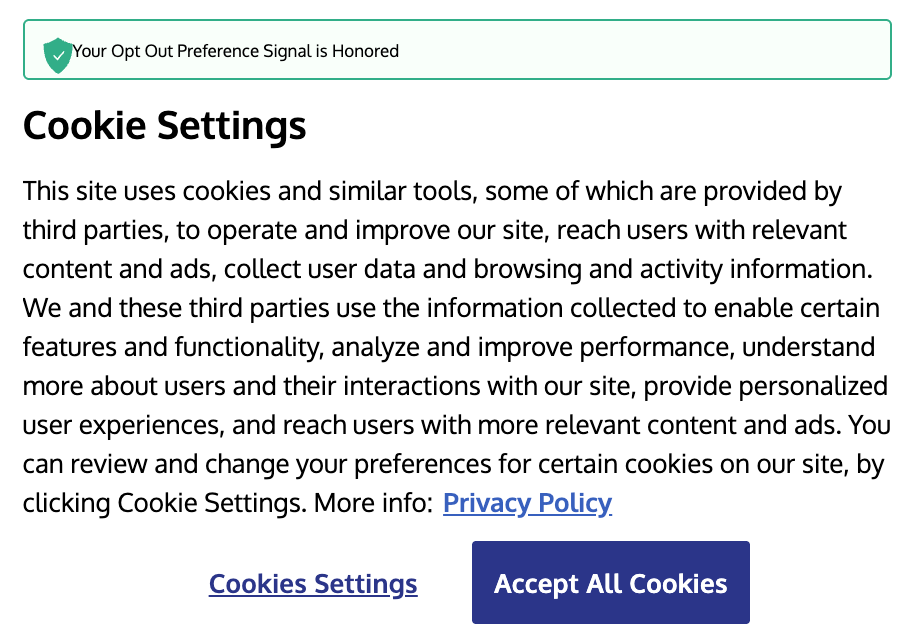
It’s nice to see confirmation that my opt out preference has been honored, but what am I supposed to do now?
There is a big button that says, “Accept All Cookies” that appears to be my main option. If I click on it, will the site still honor my opt out? Or will clicking on the button override GPC?
I decided to give it try, and as expected, clicking the only button available to me overrode my opt out.
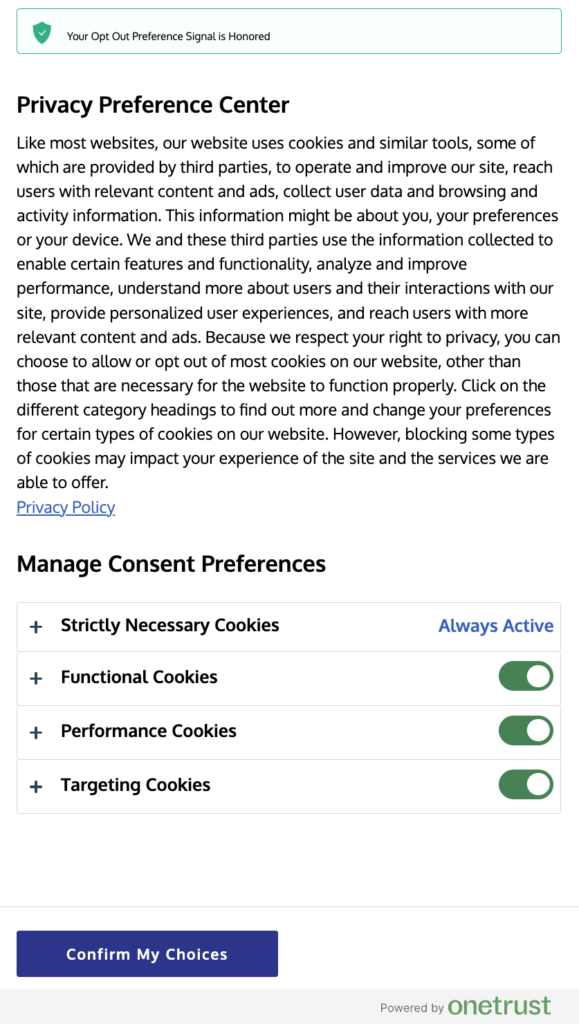
I find this preferences panel hilarious. It says it has honored my opt out, but every bit of tracking has been turned on. I tested a few other cookie consent options and found similar interfaces where you’re informed that your opt-out has been honored, but you’re still forced to make a choice about what cookies you will allow.
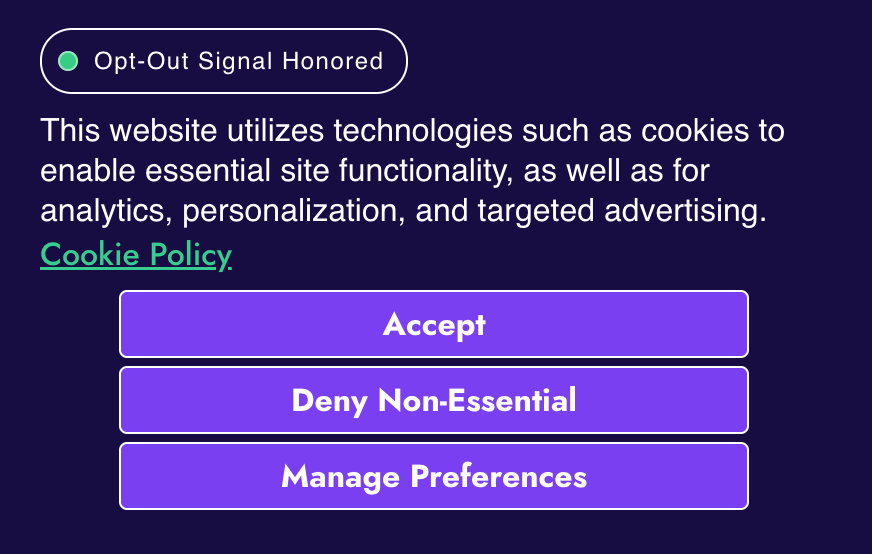
I know that for any of these banners, I can click on the cookies settings link to adjust my preferences, but isn’t the whole point of the GPC opt out to streamline the process so users don’t have to manually opt out?
By contrast, the best implementation I’ve seen was a small notification that my opt-out had been honored. That’s it. No further action required. I believe this is what California was hoping for when it added this new requirement.
It seems the new rule has surprised cookie consent managers. In my testing, many of them do not yet honor the notification requirement even if they honor GPC behind the scenes. So perhaps these broken and confusing user experiences are because notifications are being quickly grafted onto existing applications.
However, when I see that the service is aware that I’ve opted out, and the only button it provides is one to accept all cookies, I find myself wondering if it is intentional. I know Hanlon’s Razor says we shouldn’t immediately ascribe situations like this to malice so I’m hopeful that over time cookie consent banners will do a better job of honoring GPC opt outs.
If you’re interested in learning more about privacy and cookies, check out my recent two-part series on cookie consent management in 2026.
Jason Grigsby is one of the co-founders of Cloud Four, Mobile Portland and Responsive Field Day. He is the author of Progressive Web Apps from A Book Apart. Follow him at @grigs.